n8n Workflow Backup to Google Drive
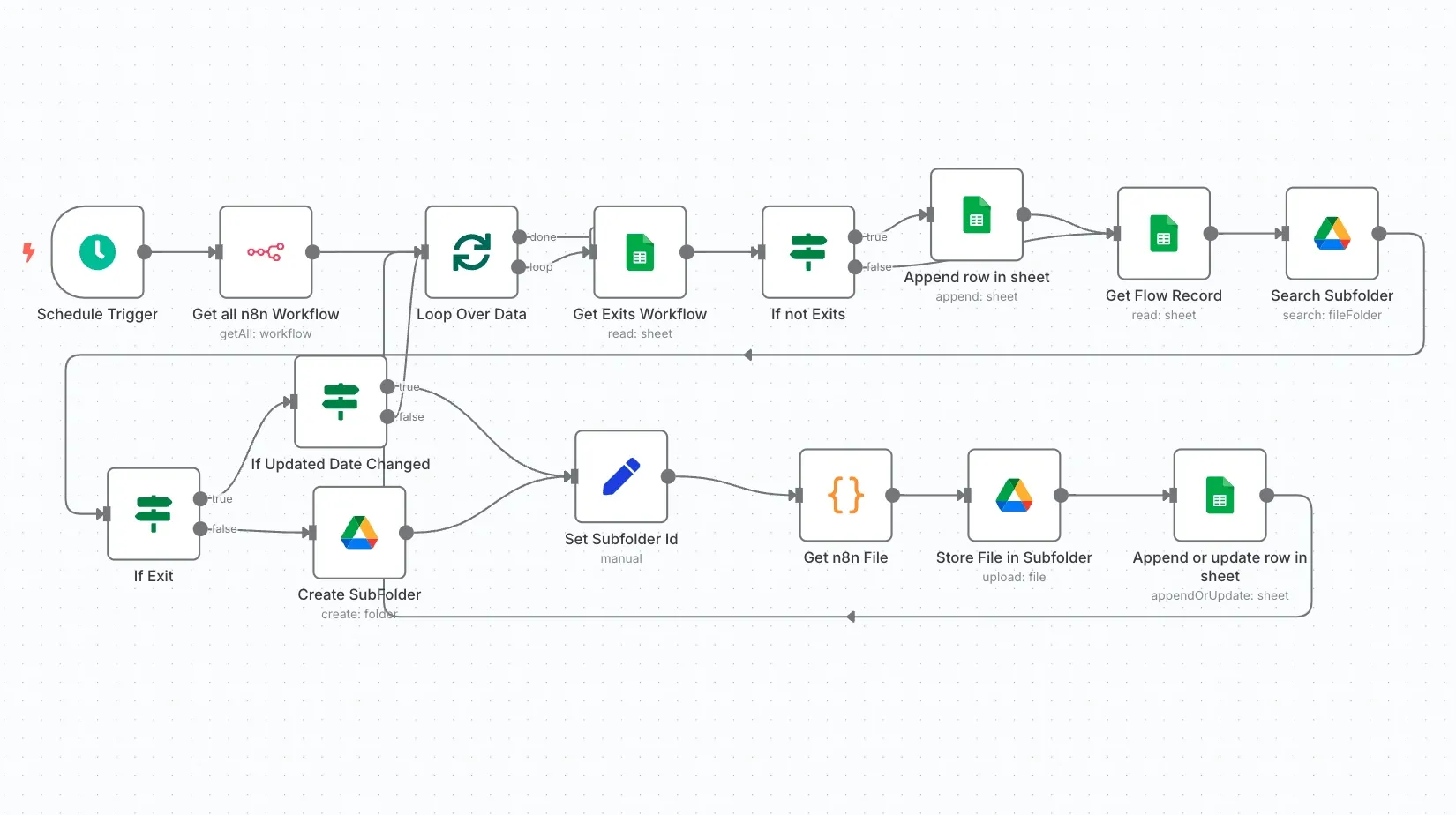
Backs up every n8n workflow to Google Drive on a schedule, one subfolder per workflow, and only saves a new copy when a workflow has actually changed. A Google Sheet keeps the index.
On this page
How it works
- On schedule, all workflows are fetched through the n8n API.
- Each workflow gets its own Drive subfolder, created if missing.
- The sheet is checked to see whether the workflow changed since the last backup.
- Changed or new workflows are saved as JSON files and the index is updated.
Use cases
- Self-hosted n8n instances
- Agencies managing client automations
- Version history and disaster recovery
What you need
This workflow connects to these apps.
- Google Drive
- Google Sheets
- n8n


You'll need an n8n instance, on n8n Cloud or self-hosted, and these credentials. Our credentials guide shows how to create each one.
- Google Drive account
- Google Sheets account
- n8n account
Data setup
Create these tables with these exact column names before the first run.
| Table | Columns |
|---|---|
| Workflow Backup → Sheet1Google Sheets | idNameLast BackupFolder linkLast Updated |
Setup
- Download the JSON and import it into n8n with Import from File, or copy it and paste it onto an empty canvas. The import guide walks through both.
- Connect the credentials listed above.
- Point the Sheets, Airtable, Drive, and Slack nodes at your own files and channels.
- Replace placeholder emails, phone numbers, and form links with your own.
- Times use the America/New York timezone and dates use MM/DD/YYYY. Change them if you need to, then test and activate. The setup guide covers this step by step.
Nodes
| Node | Type |
|---|---|
| Loop Over Data | splitInBatches |
| Schedule Trigger | scheduleTrigger |
| Get all n8n Workflow | n8n |
| Append row in sheet | googleSheets |
| Store File in Subfolder | googleDrive |
| Search Subfolder | googleDrive |
| If Exists | if |
| Create SubFolder | googleDrive |
| Get n8n File | code |
| Set Subfolder Id | set |
| Append or update row in sheet | googleSheets |
| If Updated Date Changed | if |
| If Not Exists | if |
| Get Flow Record | googleSheets |
| Get Existing Workflow | googleSheets |
Frequently asked questions
Backs up every n8n workflow to Google Drive on a schedule, one subfolder per workflow, and only saves a new copy when a workflow has actually changed. A Google Sheet keeps the index. It's a 16-node n8n workflow.
An n8n instance, on n8n Cloud or self-hosted, and credentials for Google Drive, Google Sheets, and n8n. It uses only nodes that ship with n8n, so there's nothing else to install.
It works with 1 table in Google Sheets. Create it with the column names listed under Data setup on this page before the first run.
Download the JSON, then in n8n create a new workflow, open the menu in the top right, and choose Import from File. You can also copy the JSON and paste it onto an empty canvas.
Yes. It's free to download, import, and change, with no sign-up. You only pay for the apps it connects to, where those aren't free on your plan.