HubSpot Ticket Auto-Acknowledgement
Customers get an instant confirmation email with their ticket number as soon as a new HubSpot ticket is opened, so nobody wonders whether their request was received.
On this page
How it works
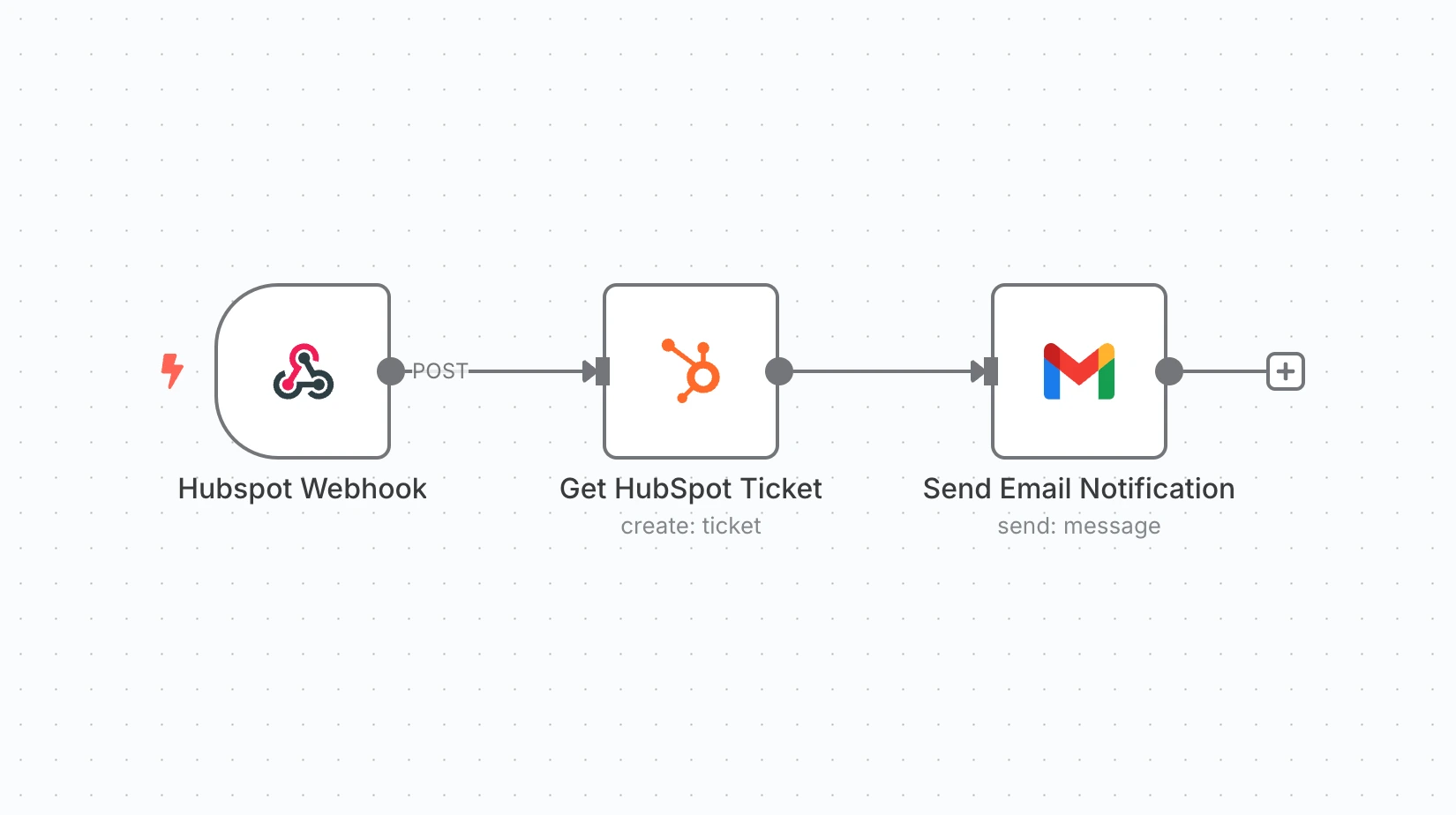
- A HubSpot webhook fires when a ticket is created.
- The full ticket record is fetched from HubSpot.
- A friendly acknowledgement email with the ticket ID is sent to the customer.
Use cases
- Support desks using HubSpot
- SaaS customer success teams
- Any helpdesk that wants faster first response
What you need
This workflow connects to these apps.
- HubSpot

You'll need an n8n instance, on n8n Cloud or self-hosted, and these credentials. Our credentials guide shows how to create each one.
- Gmail account
- HubSpot account

Setup
- Download the JSON and import it into n8n with Import from File, or copy it and paste it onto an empty canvas. The import guide walks through both.
- Connect the credentials listed above.
- Point the Sheets, Airtable, Drive, and Slack nodes at your own files and channels.
- Replace placeholder emails, phone numbers, and form links with your own.
- Times use the America/New York timezone and dates use MM/DD/YYYY. Change them if you need to, then test and activate. The setup guide covers this step by step.
Nodes
| Node | Type |
|---|---|
| Hubspot Webhook | webhook |
| Get HubSpot Ticket | hubspot |
| Send Email Notification | gmail |
Frequently asked questions
Customers get an instant confirmation email with their ticket number as soon as a new HubSpot ticket is opened, so nobody wonders whether their request was received. It's a 3-node n8n workflow.
An n8n instance, on n8n Cloud or self-hosted, and credentials for Gmail and HubSpot. It uses only nodes that ship with n8n, so there's nothing else to install.
Download the JSON, then in n8n create a new workflow, open the menu in the top right, and choose Import from File. You can also copy the JSON and paste it onto an empty canvas.
Yes. It's free to download, import, and change, with no sign-up. You only pay for the apps it connects to, where those aren't free on your plan.